
Pixelated / 16-bit
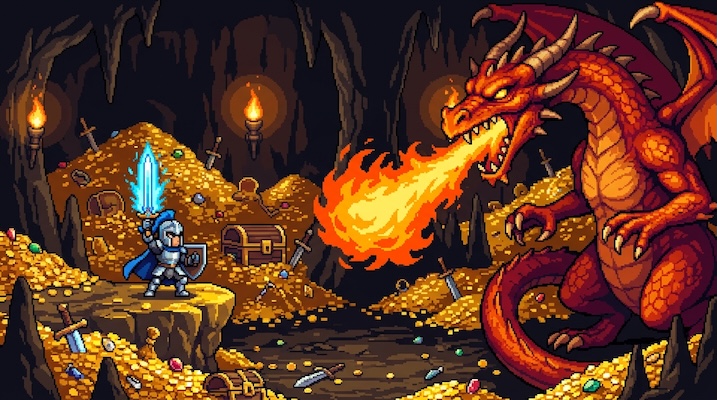
Best for:
Game assetsProfile picturesDesktop wallpapersSocial media postsTwitch/YouTube bannersSticker designsMerchandise
Sample prompt used to generate the hero image
16-bit pixel art scene of a samurai standing on a moonlit pagoda rooftop overlooking a cherry blossom valley, SNES-era Super Nintendo aesthetic, 16:9 landscape format. Every element composed of individually visible square pixels on a strict pixel grid. Limited color palette of 32 colors — deep indigo sky, soft pink cherry blossoms, warm lantern glow, cool stone grey. Detailed pixel-level shading using dithering patterns rather than smooth gradients. Each tile and sprite is pixel-perfect. The moon casts a visible pixel-shadow from the pagoda.Prompt Variations
Section titled “Prompt Variations”16-bit pixel art character sprite of [CHARACTER — e.g., a wizard with a flowing purple robe, pointed hat, and a glowing staff], 1:1 square format. SNES-era aesthetic. Full-body sprite on a [COLOR] background. Every pixel individually visible on a strict pixel grid. Limited 16-color palette. Detailed pixel shading using dithering patterns. Clean pixel-perfect outlines. The character is in a [POSE — e.g., idle stance / casting spell / walking]. Inspired by Final Fantasy VI / Chrono Trigger sprite work.16-bit pixel art landscape of [SCENE — e.g., a dense enchanted forest with glowing mushrooms, a winding path, and fireflies], SNES-era aesthetic, 16:9 landscape format. Every element composed of individually visible square pixels. Limited 32-color palette — [PALETTE DESCRIPTION]. Dithering patterns for shading rather than smooth gradients. Multiple parallax layers — foreground foliage, midground path, background trees. Each pixel intentionally placed. Atmospheric, detailed, nostalgic.16-bit pixel art battle scene — [SCENE — e.g., a knight fighting a massive dragon in a volcanic cavern], SNES RPG battle screen aesthetic, 16:9 landscape format. Characters and enemies as detailed pixel sprites with attack animation frames. Spell effects rendered as pixel particles and flashes. Limited 32-color palette. Dithering patterns for shading. Visible pixel grid. Health bars and UI elements in the pixel art style. Inspired by Final Fantasy / Chrono Trigger / Secret of Mana battle screens.Game Boy-style monochrome pixel art of [SUBJECT — e.g., a cat curled up sleeping in a window], original Game Boy 4-shade green palette (darkest green, dark green, light green, lightest green), 1:1 square format. 160×144 pixel resolution feel. Every pixel individually visible. Simple, charming, limited by the 4-tone palette constraint. No anti-aliasing. Clean pixel outlines. Nostalgic 1989 handheld aesthetic.16-bit pixel art sprite sheet showing [CHARACTER] in a 4-frame [ANIMATION — e.g., walking cycle], arranged horizontally on a transparent/checkered background, 16:9 landscape format. Each frame shows the character in a different pose of the animation sequence. SNES-era aesthetic. Consistent pixel grid, limited 16-color palette, dithering shading, pixel-perfect outlines across all frames. The four frames read as a smooth animation cycle.Create a 16-bit pixel art character sprite of [CHARACTER]. SNES-era aesthetic. Full body on [COLOR] background. Visible pixel grid. Limited 16-color palette. Dithering shading. Pixel-perfect outlines. 1:1 square format.Create a 16-bit pixel art landscape of [SCENE]. SNES aesthetic. Visible square pixels. 32-color palette. Dithering patterns. Multiple parallax layers. Nostalgic, detailed. 3:2 landscape format.Create a Game Boy-style pixel art of [SUBJECT]. Original 4-shade green palette. 160×144 feel. Every pixel visible. Simple, charming, nostalgic. 1:1 square format.16-bit pixel art character sprite, [CHARACTER], SNES aesthetic, visible pixel grid, 16-color palette, dithering, pixel-perfect outlines --ar 1:116-bit pixel art landscape, [SCENE], SNES era, visible pixels, 32-color palette, dithering, parallax layers, nostalgic --ar 16:916-bit pixel art battle scene, [SCENE], RPG battle screen, pixel sprites, spell effects, limited palette, dithering, Final Fantasy Chrono Trigger --ar 16:916-bit pixel art sprite, [CHARACTER], SNES aesthetic, visible pixel grid, limited 16-color palette, dithering, pixel-perfect, retro gamingNegative Prompt
smooth, anti-aliased, 3d, realistic, photograph, high resolution16-bit pixel art landscape, [SCENE], SNES era, visible pixels, 32-color palette, dithering patterns, parallax layers, 8kNegative Prompt
smooth, anti-aliased, photograph, 3d, realistic, modernImage-to-Image Transformations
Section titled “Image-to-Image Transformations”Using the attached photo as reference, recreate the entire scene as 16-bit pixel art in the SNES era style. Reduce all elements to a visible pixel grid. Limit the color palette to 32 colors that approximate the original photo's tones. Use dithering patterns for shading instead of smooth gradients. Preserve the composition and key elements but simplify details to what pixels can express. Every pixel should be individually visible and intentional.[Upload Photo] "Recreate this as 16-bit pixel art, SNES style. Visible pixel grid. 32-color palette. Dithering shading. Simplify to pixel-expressible detail."[IMAGE_URL] 16-bit pixel art, SNES aesthetic, visible pixel grid, limited palette, dithering, retro gaming --iw 1.0 --ar 16:9Tips & Best Practices
Section titled “Tips & Best Practices”- “Visible pixel grid”: Without this, AI models anti-alias the pixels into smooth edges. Always insist on visible, crisp pixel boundaries.
- Limit the palette explicitly: “16-color palette” or “32-color palette” forces the AI to work within authentic constraints. More colors dilute the retro feel.
- Dithering is the shading: “Dithering patterns rather than smooth gradients” defines how 16-bit art handles tonal transitions — alternating pixels of two colors to create the illusion of a third.
- Name the hardware: “SNES / Super Nintendo” or “Sega Genesis” or “Game Boy” — each has a distinct aesthetic and color set. The hardware reference calibrates the AI.
- Common pitfalls: “Pixel art” alone often produces modern, high-color pixel art that lacks retro charm. Always constrain the palette and name the hardware era.
- Pairs well with: Isometric Pixel City (same medium, different perspective), Embroidered / Cross-Stitch (same grid constraint, physical vs. digital)