
Glitch Art
Best for:
Social media postsAlbum coversEditorial illustrationsProfile picturesPhone wallpapersMusic visualizersCyberpunk themed content
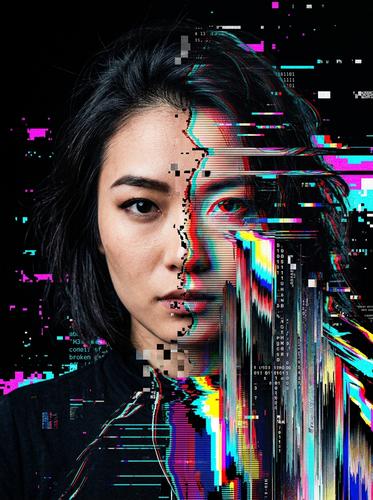
Sample prompt used to generate the hero image
Glitch art portrait of a woman looking directly at camera, 3:4 vertical format. The image appears corrupted — horizontal scan lines distort sections of the face, RGB color channels split apart with red shifted left and cyan shifted right, pixel-sorted vertical streaks drag portions of the hair downward into data ribbons. JPEG artifact blocks appear in the corrupted zones. The uncorrupted areas are crisp and photorealistic, creating contrast with the broken sections. Neon cyan and magenta dominate the color palette against a dark background. The overall effect is beautiful and unsettling.Prompt Variations
Section titled “Prompt Variations”Glitch art portrait of [SUBJECT — e.g., a person with short dark hair], 1:1 square format. The image appears corrupted — RGB color channels split with [COLOR 1] shifted left and [COLOR 2] shifted right. Horizontal scan lines distort the [AREA — e.g., eyes and mouth]. Pixel-sorted vertical streaks in the hair/background. JPEG artifact blocks in corrupted zones. Uncorrupted areas remain crisp and photorealistic. Neon [PALETTE] against dark background. Beautiful and unsettling.Glitch art landscape of [SCENE — e.g., a mountain valley at sunset], 16:9 landscape format. The scene appears to be a corrupted digital photograph — pixel-sorted horizontal bands drag the sky colors sideways, data-moshed sections blend the mountains into smeared color ribbons, and JPEG compression artifacts create blocky zones in the shadows. RGB channel displacement on the horizon line. The foreground remains relatively intact while the sky is heavily corrupted. Vivid neon colors bleeding through the corruption.Glitch art typographic design featuring the text "[TEXT]" in bold sans-serif typography, 16:9 landscape format. The text is corrupted — individual letters shift vertically out of alignment, RGB color channels split apart, horizontal scan lines cut through the letterforms, and pixel-sorted streaks drag letter fragments downward. Neon [COLORS] against a dark background. The text remains legible despite the corruption. VHS tracking error aesthetic.Glitch art still frame appearing to be from a data-moshed video — [SUBJECT — e.g., a dancer mid-movement], 16:9 landscape format. Motion vectors from the previous frame are incorrectly applied to the current frame — the subject's body smears and distorts in the direction of their movement, creating ghostly color trails. Background bleeds into the figure and vice versa. I-frame corruption visible as blocky artifacts. Vivid, hyper-saturated colors. Digital video error aesthetic.Vaporwave-glitch hybrid of [SUBJECT — e.g., a Greek marble bust], 9:16 vertical phone wallpaper format. The classical subject is corrupted with digital artifacts — horizontal scan lines, RGB channel displacement with hot pink and cyan splits, pixel sorting on the background, and JPEG compression blocks. Gradient background in pastel pink to cyan. Windows 95 dialog boxes and error messages floating around the subject. Japanese characters "美学" glitching in and out. Retro-futuristic, nostalgic, internet-aesthetic.Create a glitch art portrait of [SUBJECT]. RGB channel split, horizontal scan lines, pixel sorting, JPEG artifacts. Uncorrupted areas crisp, corrupted areas distorted. Neon [PALETTE] on dark background. 1:1 square format.Create a glitch art landscape of [SCENE]. Pixel-sorted bands, data-moshed sections, JPEG artifacts, RGB displacement. Foreground intact, sky heavily corrupted. Vivid neon bleeds. 3:2 landscape format.Create a vaporwave-glitch hybrid of [SUBJECT]. Scan lines, RGB split, JPEG blocks, pixel sorting. Pastel pink-cyan gradient background. Windows error dialogs. Retro internet aesthetic. 2:3 vertical format.Glitch art portrait, [SUBJECT], RGB channel split, scan lines, pixel sorting, JPEG artifacts, neon cyan magenta, dark background, beautiful corrupted --ar 1:1Glitch art landscape, [SCENE], pixel-sorted bands, data-moshed, JPEG artifacts, RGB displacement, neon color bleeds --ar 16:9Glitch art typography "[TEXT]", RGB split, scan lines, pixel sorting, letter displacement, neon colors, dark background --ar 16:9Glitch art portrait, [SUBJECT], RGB channel split, scan lines, pixel sorting, JPEG artifacts, neon, dark background, corrupted digitalNegative Prompt
clean, normal, untouched, smooth, painting, illustrationGlitch art landscape, [SCENE], pixel-sorted, data-moshed, RGB displacement, JPEG artifacts, corrupted, neon colorsNegative Prompt
clean, normal, smooth, undistorted, paintingImage-to-Image Transformations
Section titled “Image-to-Image Transformations”Using the attached photo, apply glitch art corruption effects. Split the RGB color channels — shift red left and cyan right. Add horizontal scan line distortion across [AREA]. Apply pixel sorting to the [REGION — e.g., background/hair/sky] creating vertical color ribbons. Introduce JPEG compression artifacts in the shadows. Keep [AREA — e.g., the eyes and center of the face] relatively uncorrupted for contrast. The overall effect should feel like a beautiful system failure.[Upload Photo] "Apply glitch art effects: RGB channel split, horizontal scan lines, pixel sorting, JPEG artifacts. Keep some areas crisp for contrast. Neon color palette."[IMAGE_URL] Glitch art, RGB channel split, scan lines, pixel sorting, JPEG artifacts, neon, corrupted digital --iw 2.0 --ar 1:1Tips & Best Practices
Section titled “Tips & Best Practices”- Name specific glitch types: “Pixel sorting,” “data-moshing,” “RGB channel displacement,” “JPEG artifact blocks” — each produces a distinct effect. Combine 2-3 for the best results.
- Contrast matters: The most compelling glitch art has areas of clarity alongside areas of corruption. “Uncorrupted areas remain crisp” creates this duality.
- Neon palette on dark: The classic glitch art palette is neon cyan, magenta, and hot pink against dark backgrounds. The neon pops through the corruption.
- VHS vs. digital: “VHS tracking error” produces horizontal band distortion. “JPEG corruption” produces blocky artifacts. “Data-moshing” produces motion smears. Choose based on the mood.
- Common pitfalls: Avoid “slightly glitched” — go bold or the effect barely registers. Don’t overload every type of glitch — choose 2-3 and commit.
- Pairs well with: Cyberpunk Noir (similar neon-on-dark palette), Vaporwave / Synthwave Retrowave (shares the digital nostalgia aesthetic)